
One of the most common mistakes when evaluating web scraping tools is focusing only on the pricing tables shown for normal crawling operations. In practice, these pricing pages often overlook several factors that significantly affect the real cost of running a scraping project. In this article, I’ll cover the key points you need to understand before making any scraper live.
What Pricing Pages Usually Show (and Why It Looks Simple)
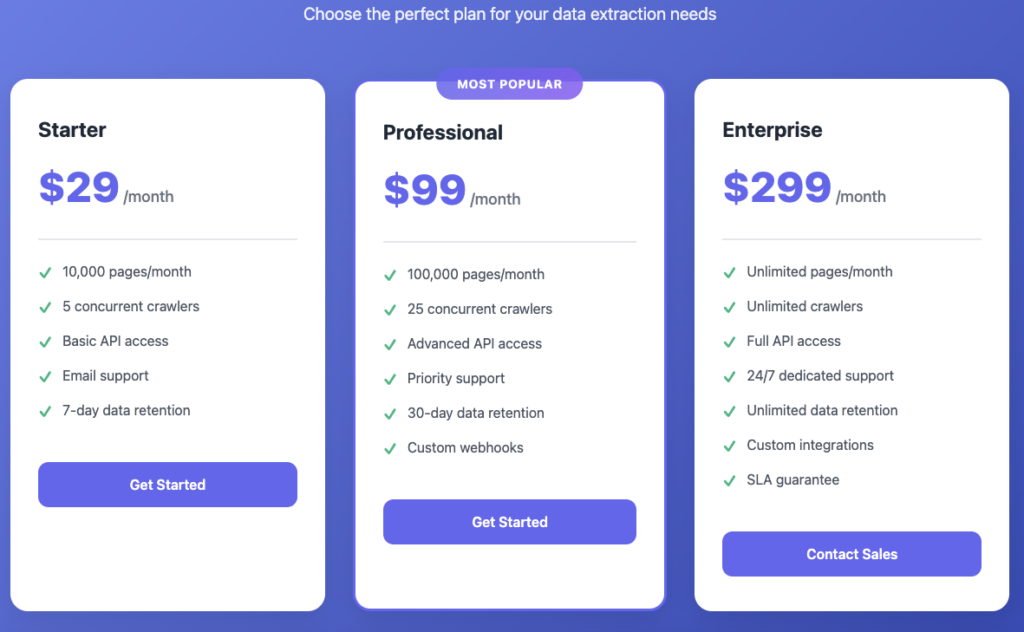
The above example image of pricing table of a scraping tool pricing plan looks very simple although it’s a dummy image and not pointing to any real world scraping tool but it looks very similar to them.
Most of the time the pricing which looks very simple is actually not when you start using it here is why.
- Most scraping tools allows you to buy credit & use them later which means credit will start burning when you start consuming their services.
- Credit burn solely depends on the target website difficulty. The more the website is difficult it will burn more credit when you start using it.
- If target website need geo-location ip address then the credit per website URL will be increased maybe up to 10 or 20 credit per URL crawl.
- If you are scraping some ecommerce related or similar type of webs then it will burn more credit as compared to pricing table.
So at the end the pricing table which looked very simple it becomes more & more expensive when you actually start scraping. So make sure you test it before finalizing any tool.
The Cost Metric That Actually Matters: Successful Data Extraction
When teams try to estimate the cost of a scraping project, they often focus on a single metric: the number of requests they plan to run. In practice, this is rarely the metric that determines real cost. What matters far more is how much usable data you successfully extract—and what it takes to achieve that outcome consistently.
Several underlying factors shape this cost, and ignoring them leads to inaccurate expectations.
Let’s go through all of the following one by one.
Volume of Target URLs
The most obvious cost driver is the total number of URLs you plan to crawl on a daily, weekly, or monthly basis. More URLs naturally mean higher usage of third-party scraping services. While this seems straightforward, the real cost emerges when this volume is mapped against how credits are consumed by the scraping provider—especially for complex websites where each request may burn multiple credits instead of one.
10,000 Crawls / Day = Expensive
25,000 Crawls / Day = More Expensive
It will keep getting expensive if you keep increasing the total # of target URL’s even if the URL’s are same.
Infrastructure and Data Storage Overhead
Scraping costs do not stop at API usage. Every crawling system requires infrastructure to consume third-party APIs, process responses, and store extracted data. Server capacity, database usage, and storage management all contribute to operational expenses. The more data you extract and retain, the more these backend costs grow over time, even if they are not immediately visible in early estimates.
Data Processing and Development Effort
Most scraping APIs return raw HTML or unstructured data. Turning that output into something meaningful—clean fields, normalized values, structured datasets—requires development effort. This includes writing parsers, handling edge cases, and adjusting logic as requirements evolve. Whether handled internally or outsourced, this engineering work adds a recurring cost that pricing pages never account for.
Operational Maintenance and Breakage
Scraping systems are not “set and forget.” Websites change their layouts, update UI frameworks, and modify HTML structures regularly. When this happens, crawlers fail silently or produce incorrect data. Monitoring, debugging, and fixing these issues introduce ongoing operational costs that accumulate over time. Even well-built crawlers require continuous maintenance to remain reliable.
Taken together, these factors show why counting requests alone is a poor way to estimate scraping costs. The real metric is not how many API calls you make, but how much accurate, usable data you extract—and how much effort it takes to keep that process running smoothly.
Hidden Cost #1: Failed and Retried Requests
Failed Request
(Timeout / Error)
Retry Attempt
(Exponential Backoff)
Keep retrying of the failure crawls can drastically increase your scraping budget. If one of the following failure is happening during the crawl it has to be checked and fixed before you make thousands of failed calls.
- Target website is not down or having some technical issue. ( Most of the time when the target website server is down most of the third party web scraping tools cancels the request without burning. the credit but don’t take a chance and keep monitor your scraping every single day)
- When the target website is able to crawl but not able to collect the required data, This usually happens when the HTML tags are changed by the vendor. On the other side your system keeps crawling it even when no useful data is returning by the system. High level monitoring and alerts are required to avoid this situation.
- There are many other factors are involved in this which can make your crawler over-run and burn all credit so make sure system is capable enough to update you when something goes wrong.
Hidden Cost #2: Over-Collecting Data You Don’t Need
Scraper should not over collect data which we don’t even need it. If you have thousands of URL’s to be crawled and only the little piece of information is useful then only collect that information only instead of collecting everything.
- Over collecting of data may increase your server response time and it may get slow and you may have to increase RAM or CPU. So only collect data which you think is important to you.
- Storage may get full very fast if you are crawling thousands of URL every single day and dumping data into any kind of storage eg Database or hard disk.
So make sure you only collect important data & ignore necessary data. Although disk space is very cheap now a days but still the less you store the more it is good for our environment.
Hidden Cost #4: Maintenance and Breakage Over Time
No matter how well a crawler is built, it will eventually stop working and require changes. This is because most scraping projects depend heavily on the target website, and those websites change over time.
A crawler can break for several common reasons:
- The target website changes its HTML structure or user interface
- New security or anti-bot protections are added
- The data format or layout is modified
- The website is fully redesigned or revamped
When any of these changes happen, the crawler usually needs to be updated or rebuilt. This process takes time and effort, and it does not happen just once. Maintenance and redesign are ongoing requirements, and they introduce a hidden cost that appears again and again over the life of a scraping project.
Hidden Cost #5: Engineering Time and Operational Drag
A scraping system does not stop after it is deployed. Once a crawler is running, it must keep returning correct and reliable data, and that requires ongoing attention.
In real use, crawlers need monitoring through logs, alerts, or basic checks to catch issues like missing data, wrong values, or partial failures. Without monitoring, problems often go unnoticed until bad data is already being used.
This work has a cost. Someone needs to review alerts, check results, and fix issues regularly. Even if it takes only a little time each day, it becomes a permanent responsibility. Crawlers rarely run on their own for long periods, and the effort needed to keep them accurate is a hidden cost that pricing pages never show..
Why Comparing Tools by Price Alone Leads to Bad Decisions
Comparing scraping tools based on price alone often leads to poor decisions because pricing does not reflect what matters most in real scraping workloads: fit, reliability, and usable output. A cheaper plan can easily become more expensive over time if it fails more often, returns incomplete data, or burns credits faster than expected for your target websites.
Price must be evaluated against your actual workload
Most tools display pricing in the form of credits, request limits, or monthly plans. But those numbers are meaningless unless you understand how many credits your specific target websites will consume. A tool might appear affordable based on headline credits, but if your target category—such as e-commerce or region-specific pages—burns significantly more credits per request, the real cost increases quickly.
This is why price comparisons must always be workload-specific. Before choosing a provider, you need to map your use case to the tool’s credit consumption model, including factors like page complexity, region requirements, and the typical failure rate for your targets.
Data quality and completeness matter more than the cheapest plan
Even if Tool B looks cheaper than Tool A, it is not a good choice if it consistently returns partial or incomplete information. In many scraping projects, “success” is not simply receiving a response—it is receiving the correct data after the page is fully loaded and processed.
For example, if one tool reliably returns the full content you need (including dynamically loaded data) while another tool returns only partial HTML or missing fields, the cheaper tool becomes expensive in practice. It forces additional retries, workarounds, manual validation, or even a complete switch later—each of which increases real cost.
Failure handling policies change your real cost
Another often-overlooked aspect is how tools behave during failures. If requests fail due to timeouts, blocks, or site instability, does the provider still deduct credits? Does it classify the request as a successful “technical response” even when the content is unusable? How does it behave when the destination site is down or returning remembered error pages?
These policies significantly affect cost at scale. Two tools with similar pricing can produce very different total spend depending on how they handle retries, exceptions, and edge cases.
In short, price is only one input—not the deciding factor. A good tool selection process evaluates price together with credit burn for your workload, output quality, reliability, response behavior, and failure handling. Without this deeper evaluation, teams often choose tools that look cheaper upfront but become expensive and unreliable in real operations.
How to Think About Scraping Costs More Accurately
Estimating scraping costs accurately starts with one thing: understanding your project requirements in detail. Scraping costs are not universal. They depend on what you are crawling, how frequently you need updates, how complex the target websites are, and what features you must use to extract usable data reliably.
A better cost model looks beyond the headline price on a pricing page and breaks expenses into the components that actually drive spend.
Start with the real per-request cost for your workload
Begin by calculating the effective cost per API request for your specific targets—not just the base plan price. This means verifying how the provider charges for key factors such as:
- Credit burn per request for complex websites (e.g., e-commerce or heavily protected sites)
- Geo-targeting costs, if regional access is required for accurate content
- Additional charges for features like captcha handling, anti-bot options, or premium routing
Once you understand the per-request consumption model, you can estimate costs more realistically based on your expected URL volume.
Size infrastructure based on your actual needs
Scraping is not only about API usage. Your crawler also needs infrastructure to run reliably. This includes server capacity, storage, and processing overhead. Instead of overbuying, plan infrastructure based on your true workload:
- Estimate the number of URLs and crawl frequency
- Choose server capacity that matches the actual runtime workload (avoid paying for oversized machines sitting idle most of the time)
- Plan storage based on the data you truly need to retain, and avoid saving unnecessary payloads
Infrastructure should scale with requirements—not with assumptions.
Include development and operational costs from day one
Even if a third-party tool returns the page successfully, you still need engineering effort to turn raw responses into usable structured data and keep the crawler working over time. Accurate cost planning should include:
- Development effort to build and refine extraction logic
- Operational effort to monitor logs, alerts, and data quality
- Maintenance effort to handle breakage when target websites change
These costs are not visible on pricing pages, but they often represent a significant portion of real-world scraping expenses.
In short, the most accurate way to estimate scraping cost is to treat it as a system—not just an API. Combine tool usage costs, workload-specific credit burn, infrastructure needs, and ongoing operational effort. With this approach, you can avoid false expectations and build a scraping solution that remains predictable and sustainable over time.
Final Thoughts
Scraping tools often look cheap when you only see the pricing page.
In real use, costs increase because of failures, retries, and maintenance.
What matters most is getting correct data, not how many requests you send.
Planning for these things early helps you avoid surprises later..